DevLog #01 — Starting Raccoon: from an idea to a clean project
Testing the acceleration, jumping and collisions of the indie game in its purest state, before adding art.
This is the first devlog for Raccoon, the 2D action game we're making as part of the nakama team.
The idea behind these devlogs is to document the process as we build the game. We don't just want to show the final result, but also the decisions we make, the problems we run into and, above all, how this thing evolves.
Honestly, we have no idea how it's going to end up.
But let's get started.
The code is on GitHub: Hector0122/RacconCyberpunk.
First things first: the idea
Before we started coding, we had to do something that sounds pretty obvious: go back to square one and get the idea straight.
If we don't, the project gets chaotic pretty fast. You add one thing, then another, then another... and before you know it you're trying to make three different games at once.
So, for now, the idea is to make a simple game that checks a few boxes:
- A classic 2D platformer. We're drawing inspiration from games like Katana Zero, Blasphemous and Dead Cells.
- The core mechanic will be making your way through levels and finding masks that grant special abilities. One could make you invisible for a while, another could give you more speed, and another could let you jump much higher. Basically, good old power-ups, but with masks.
- For the MVP of this first phase, we want the player to be able to run, jump and attack, to have health, to have enemies that patrol and can be destroyed, and to have a start point and an end point.
For now, the masks can wait.
But the most important thing was setting a rule:
Before we start drawing pixels, making music or writing a complicated story —although, to be honest, we already have an idea— the game has to be fun. For that, we'll use placeholder sprites or simple shapes.
This might seem like the most obvious thing in the world.
But at first, it wasn't for us.
And watching little squares move around the screen was a small reality check we didn't entirely enjoy.
Setting up Unity
With the idea more or less pinned down, it was time to create the project.
I had used Unity before in a school project, several years ago, so we weren't starting completely from zero. But I didn't exactly have experience making video games either.
For this project we're using Unity 6 and the Universal 2D template.
Versions will surely keep changing while we make Raccoon, so we'll update these devlogs if anything important changes.
From the start we also installed the Web and Android modules.
The reason is simple: we want to be able to publish the game on itch.io early on, share it with friends and get feedback while there's still time to change things.
We don't want to wait until the game is finished to discover that something we thought was fun actually isn't.
If you're starting from scratch, there's really no mystery here: you create a Unity project with the Universal 2D template and you've got a pretty solid base to begin with.
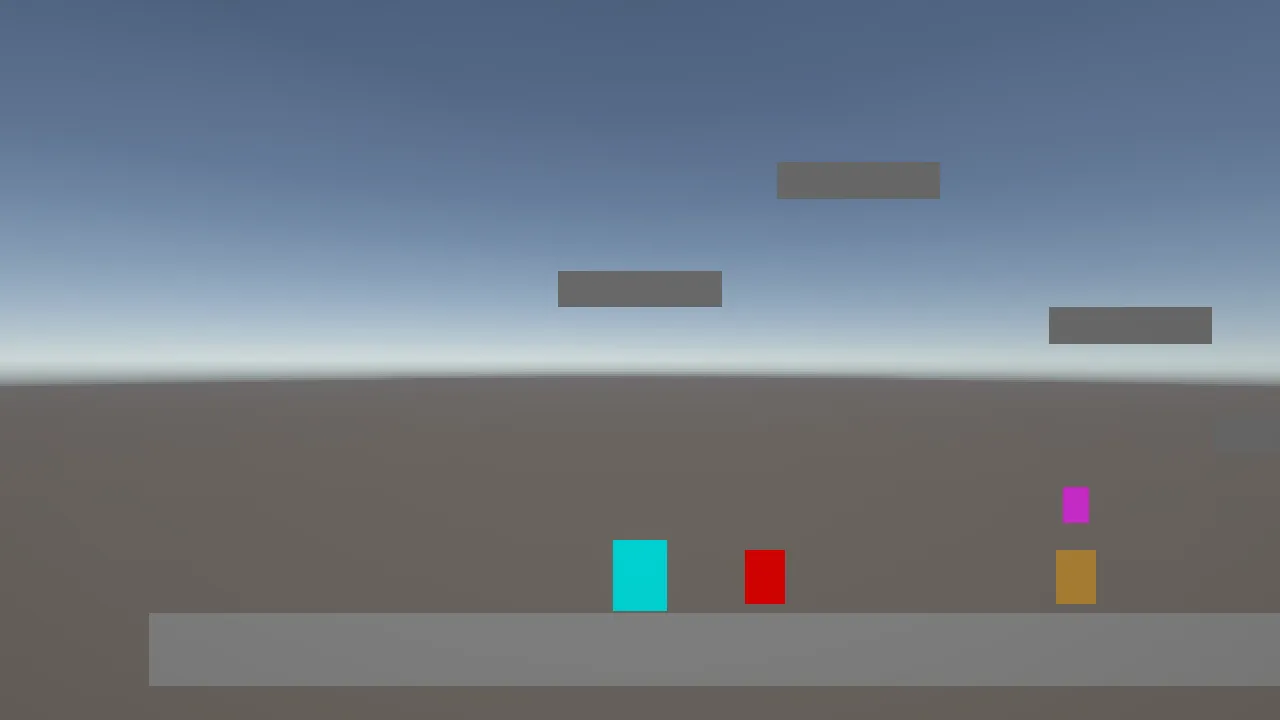
This is what the game looks like right now.
No pretty art. No effects. No music.
Just squares that move and hit each other.
And for now, we feel good about it.
A world made of squares
The first thing we wanted to see was something moving on screen.
We didn't have any drawings, so we decided everything would be colored squares: the player cyan, the enemies red, the goal green and the ground gray.
Instead of placing everything by hand in the editor, we wrote a script that builds the whole level every time we hit Play.
It sounds more complicated than it really is, and for us it turned out to be pretty handy. If a platform was too high, we changed a number and tried again.
The first surprise came very quickly.
We placed the ground, placed the player, hit Play...
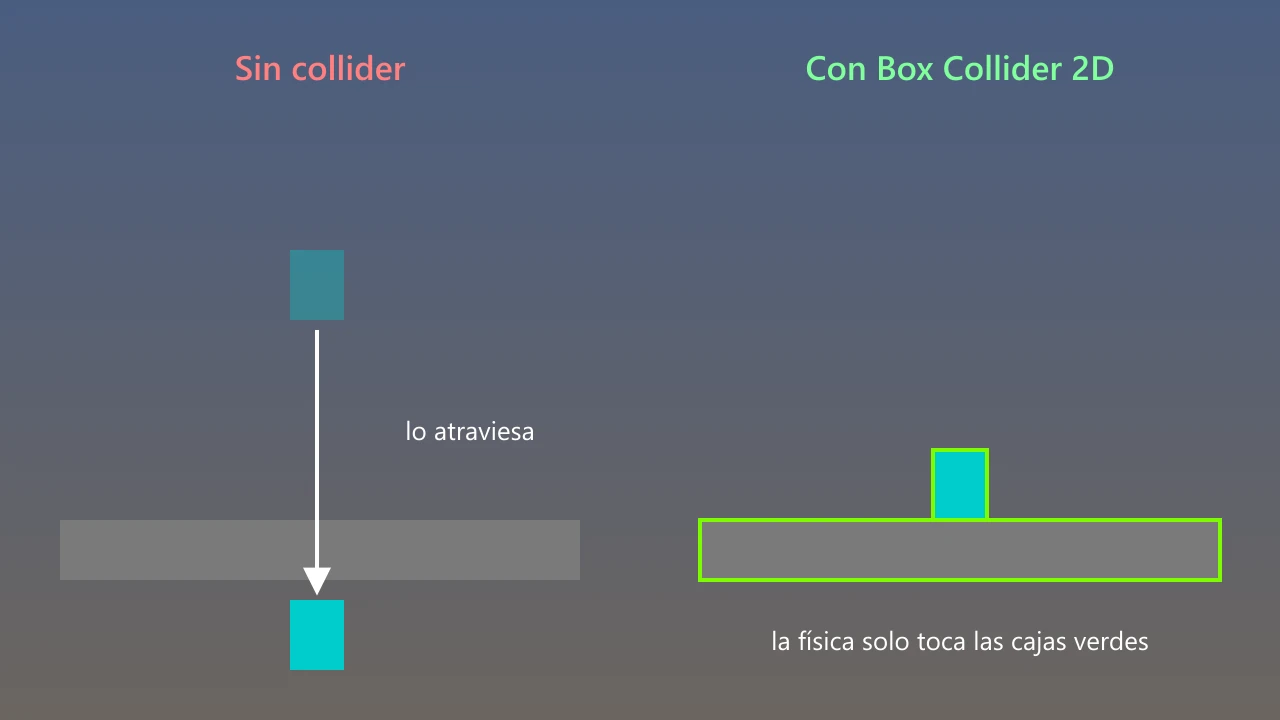
And the cyan square fell right through the ground and disappeared.
That's where we learned one of the first lessons of Unity 2D:
Just because you can see something doesn't mean it exists.
The drawing is one thing, and what physics can actually touch is another: a collider.
Without one, our ground was basically a very nice drawing that couldn't stop absolutely anything.
Since then, every square you can stand on has its own collision box.
The rolling square
With the ground finally solid, we gave the player gravity.
And another problem showed up.
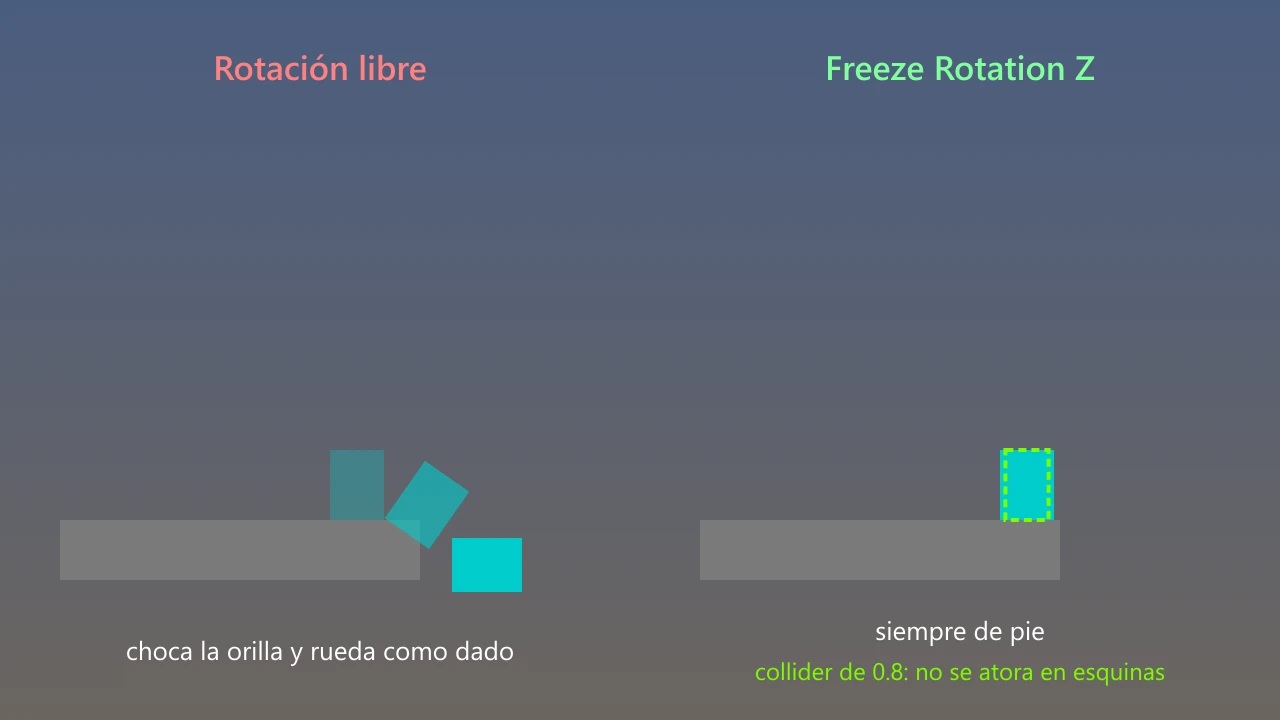
When it hit the edge of a platform, the square would tip over and start rolling like a die.
Funny the first few times.
Not so much after that.
Physics was doing exactly what it should do with a box. The problem is that our character isn't a box.
So we simply locked its rotation.
Then came the jump.
With the default gravity, the character went up way too slowly and floated back down as if it were on the Moon. Nothing like the fast feel we were going for.
So we started tweaking numbers.
We tried a higher gravity, then another, then another...
Until we landed on a value we liked.
We had another problem too: the character kept getting stuck on the corners of platforms.
The fix was to make its collision box just a little narrower than the drawing.
Almost nobody notices it at a glance.
But you can feel it when you play.
Jumping... again and again
Making the character jump was relatively easy.
When you press the button, we give it a push upward.
The problem was that it could jump always.
Even in mid-air.
Press the button a few times and the square would start flying until it left the screen.
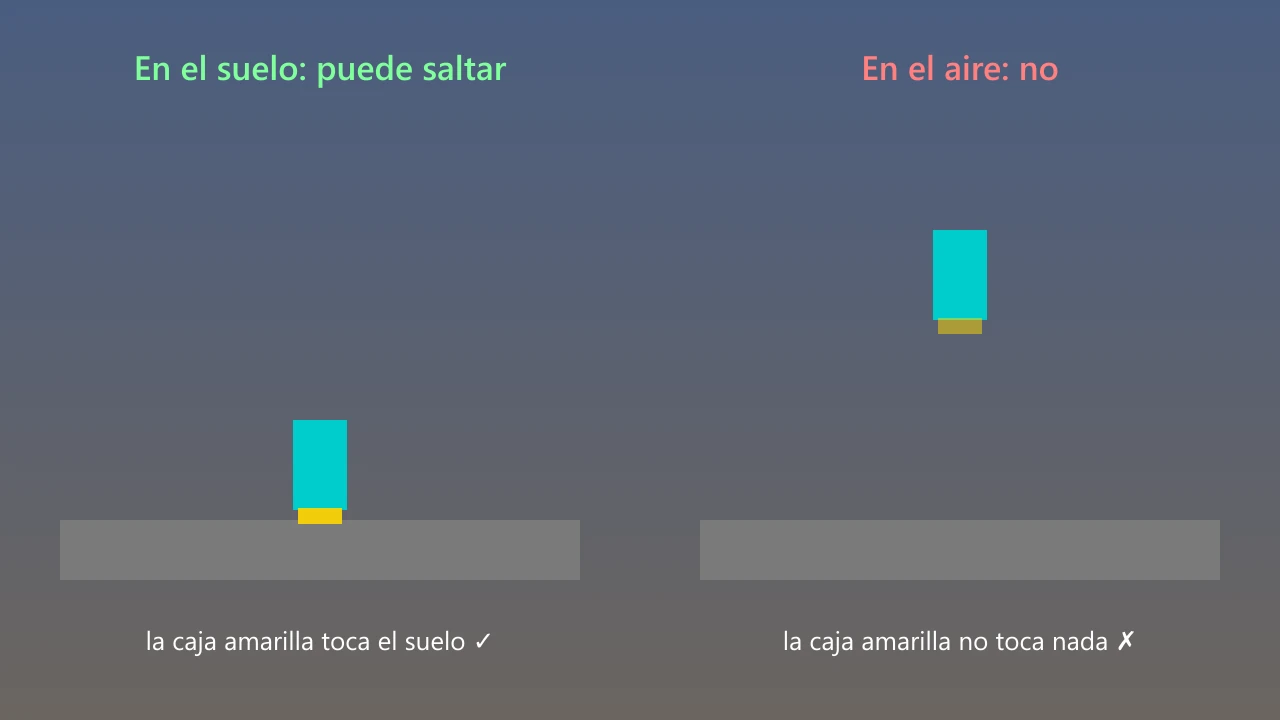
We needed the game to know whether the character had its feet on the ground.
We solved it with a small invisible box under its feet. If that box touches the ground, it can jump. If not, well, it can't.
Simple.
Then a weirder problem showed up.
Sometimes we pressed the jump button and nothing happened.
Not always.
Just every now and then.
And that's exactly the worst kind of bug to track down.
It turned out that Unity reads buttons at one pace and calculates physics at another. In some cases, the button was being read at a moment when physics hadn't had a chance to react yet.
The fix was to have the button simply leave a little note saying "wants to jump", and let physics read that note when its turn came.
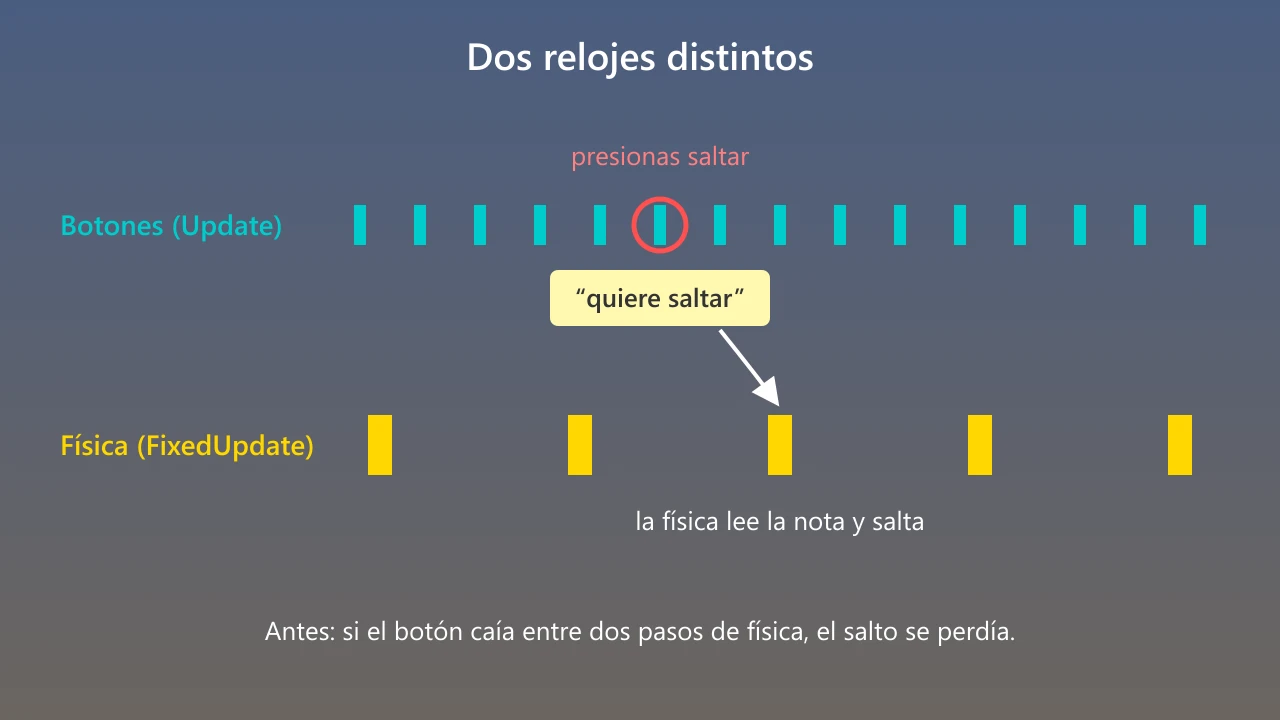
From then on, we never lost a jump again.
The final numbers —speed 8 and jump force 14— didn't come from any formula either.
We kept changing them with the game running until it simply felt right.
Falling forever
With platforms in the air, someone was bound to fall.
And someone did.
The square kept going down and down while the camera watched it disappear. The game never ended because, technically, the player was still alive.
We thought about adding death zones, triggers and some more elaborate solution.
In the end, one rule was enough:
If the player drops below a certain height, they lose.
It's one number and one condition.
The game freezes, the restart screen appears, and that's it.
The camera
Our level was already wider than the screen, so we needed the camera to follow the player.
First we did the most obvious thing: stick it directly to the character.
The result was pretty uncomfortable.
Every tiny movement of the player made the whole screen move with it.
So we changed the camera to follow with a slight delay, easing its way toward the character's position.
And suddenly the game felt much smoother.
It's one of those things nobody notices when it works well, but you feel it immediately when it doesn't.
The enemies
For now, the enemies are red squares that walk from side to side, reach a certain spot, turn around and come back.
If they touch you, you lose a life.
We have three.
And here too, there was a surprise.
A single hit took all three lives at once.
The enemy kept touching the player for several frames, and each of those frames counted as another hit.
The fix was pretty simple, and it's something we'll probably run into many times during development: after taking damage, the player blinks and becomes invincible for one second.
To defend itself, the player throws a strike.
For an instant a box appears in front of it and, if that box touches an enemy, the enemy disappears.
And with that, almost without realizing it, we had what we set out to do:
Run.
Jump.
Attack.
Lives.
Patrolling enemies.
A start.
A goal.
All with little squares.
If you want to try it
So far we've told the fun part of development.
Now comes the part for anyone who wants to open Unity and try it themselves.
Almost everything above can be set up from Unity's Inspector, without writing any code.
- So it doesn't fall through the ground: add a
Box Collider 2Dto the ground and another one to the player. - So it falls: add a
Rigidbody 2Dto the player. - So it doesn't roll: in
Rigidbody 2D→ Constraints → check Freeze Rotation Z. - So the jump feels heavier: in
Rigidbody 2D→ Gravity Scale, raise the value. We use 3, while the default is 1. - So it doesn't pass through things at high speed: in
Rigidbody 2D→ Collision Detection, select Continuous. - So it doesn't get stuck on edges: in its
Box Collider 2D, make the X Size a bit smaller than the drawing. We use 0.8.
The jump, the small box we use to check whether the player is on the ground, and falling into the void are code.
They live in PlayerController.cs and PlayerHealth.cs in the repository.
The values we kept tweaking, like moveSpeed, jumpForce and killY, are also exposed in the Inspector so you can change them quickly while testing the game.
And that's it for now.
It doesn't look like much.
But a few hours ago we had an idea and a handful of squares.
Now we have a small game we can actually play.
In the next devlog we'll tell you about something that's probably even more interesting: how we're using an AI agent to help us build Raccoon, and what happens when we give it access to the project.